Shipping a Production Chrome Extension in Your First Month at a New Company
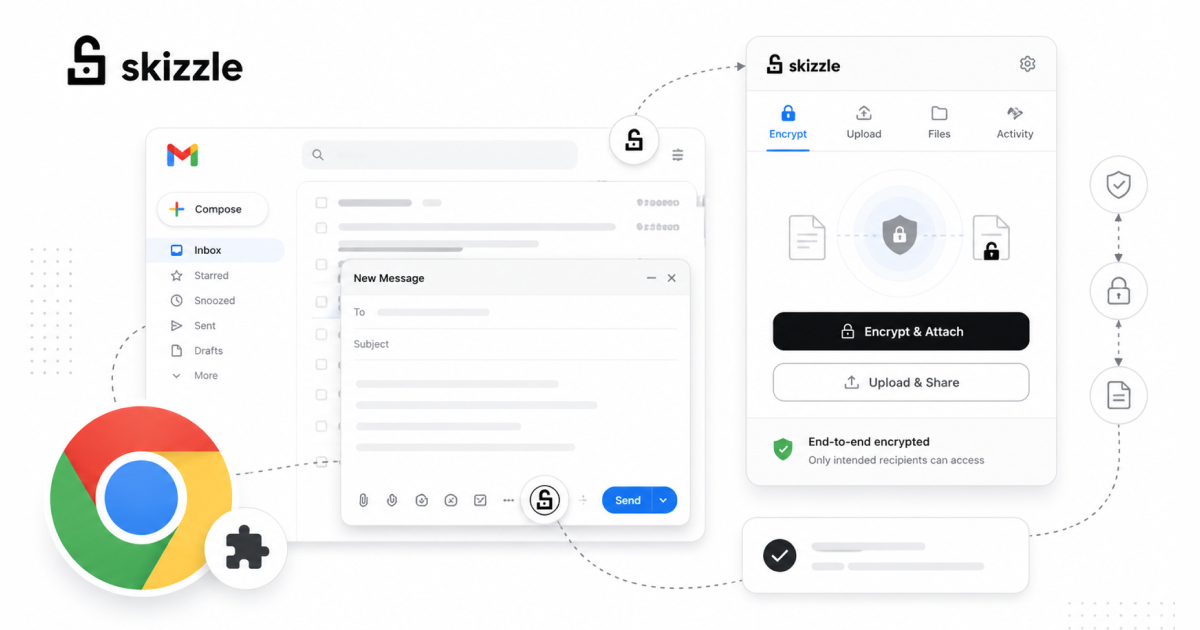
In January 2021, I joined a startup called Newfang (later rebranded to Arcana Network) as a Frontend Engineer. I had never worked in Web3 before but I had built Chrome Extensions before. I had never used gmail.js or InboxSDK. Within 30 days, I shipped Skizzle, a Chrome Extension that encrypted email attachments end-to-end using RSA keys and decentralized storage. It reached approximately 1,000 users with a 4.2 star rating before the company pivoted.
This is the story of how that happened, what I learned, and what I would do differently today.
Understanding the product
When I joined, the team had already ideated the product and built a basic boilerplate. But “basic boilerplate” in this case meant a nearly empty extension scaffold with some file structure but some basic functionality. The product vision was clear: let Gmail users encrypt email attachments so that only the intended recipient can decrypt them, without either party managing encryption keys manually.
The architecture was conceptually elegant: encrypt attachments client-side using RSA keys generated by Web3Auth (called Torus at the time), upload the encrypted files to a decentralized storage layer, and replace the original attachment with a link. When the recipient opens the email, the extension detects the encrypted attachment link, retrieves the file from storage, decrypts it client-side using the recipient’s keys, and presents the original file.
My first few days were spent understanding this architecture, reading the Web3Auth documentation, and figuring out the actual work that’ll go into this Chrome Extension.
The Gmail integration problem
The hardest technical challenge was not the encryption, it was the Gmail integration. Gmail does not have an API for “detect when a user attaches a file to an email they are composing.” Gmail’s web interface is a complex single-page application with obfuscated class names that change regularly. You cannot simply query the DOM for a stable selector.
I evaluated two tools for this: gmail.js and InboxSDK.
gmail.js is an open-source library that observes Gmail’s DOM and provides event-based hooks for things like “a new compose window opened,” “user is typing,” “email was sent.” It works by monitoring DOM mutations and mapping them to semantic events. It is lightweight but fragile, meaning when Gmail updates its DOM structure, gmail.js can break until the library is updated.
InboxSDK is a more robust commercial library that provides a stable API for interacting with Gmail’s UI. It handles Gmail DOM changes gracefully because it is actively maintained by a company (Streak) that depends on it for their own Gmail extension.
I ended up using both. gmail.js for observing the email composition flow and detecting attachments (and for Firefox support, because InboxSDK was breaking on Firefox), and InboxSDK for more reliable UI interactions where gmail.js’s event coverage was insufficient (such things were also not supported on Firefox and the Firefox version was kept minimal for the initial launch).
Building the encryption pipeline
With Gmail integration figured out, the next step was about the encryption pipeline itself.
When a user composes an email with encryption enabled (either globally via extension settings or per-attachment via a toggle I added to the compose UI), the flow is:
- User attaches a file to their email
- Extension intercepts the attachment before the email is sent
- File gets encrypted client-side using the recipient’s RSA public key (fetched from Web3Auth)
- Encrypted file is uploaded to decentralized storage
- Original attachment gets replaced with a link to the encrypted file
- Email is sent with the link instead of the raw attachment
On the receiving end:
- Recipient opens the email
- Extension scans the email body for encrypted attachment links
- Extension fetches the encrypted file from decentralized storage
- File is decrypted client-side using the recipient’s RSA private key (from Web3Auth)
- Decrypted file is presented to the user as a downloadable attachment
The entire encryption and decryption process happens in the browser. No plaintext data ever leaves the user’s machine. The storage layer only ever sees encrypted blobs.
Cross-browser support
The original plan was Chrome only. But the company wanted Firefox support as well, and they wanted it for the initial launch.
Chrome Extensions and Firefox Add-ons use largely the same WebExtension APIs, but there are meaningful differences in how they handle permissions, background scripts, and content script injection. I maintained a single codebase with build-time branching for the platform-specific differences.
The biggest challenge was testing. Chrome and Firefox have different developer tools for extension debugging, different processes for loading unpacked extensions, and different review processes for store submission. I was essentially testing every feature twice.
In retrospect, I would have pushed back on Firefox support for the initial launch and shipped it as a fast-follow later. Cross-browser support added few more days to the timeline that would have been better spent on polish and edge case handling.
Edge cases and store submission
The last week was the most stressful. The core flow worked, but edge cases were everywhere.
What happens when the recipient does not have the extension installed? They see a link in the email, click it, and land on a web application I built alongside the extension. This web app lets users log in via Web3Auth, retrieve their keys, and decrypt the attachment in the browser, no extension required. This fallback path was critical for adoption, because you cannot require both the sender and receiver to have the extension installed for the product to be useful.
What happens when the sender attaches a 50MB file? Decentralized storage has upload limits and latency characteristics different from traditional cloud storage. I implemented chunked uploads with progress indicators and size validation with user-friendly error messages.
What happens when Gmail updates its DOM? gmail.js handles most cases, but I added defensive coding throughout, null checks on every DOM query, graceful degradation when elements are not found, and error reporting that logs failures without crashing the extension.
Chrome Web Store submission was straightforward. The review process took approximately 3 days. It was approved on the first submission.
What I learned
Scope aggressively. The difference between shipping in 30 days and shipping in 90 days is almost always scope, not speed. I shipped a working product with the core encryption flow, a fallback web app, and cross-browser support. I did not ship: attachment previews, group encryption (multiple recipients with different keys), integration with email providers beyond Gmail, or a mobile companion app. All of these were on the roadmap but none were necessary for a working v1.
Start with the hardest integration first. Initial days spent on the Gmail DOM integration were the riskiest part of the entire project. If gmail.js had not worked, the entire product concept would have needed rethinking. By tackling this first, I de-risked the project early. If I had spent two weeks building the encryption pipeline first and then discovered that Gmail integration was a dead end, those two weeks would have been wasted.
Build the fallback path early. The web app fallback for recipients without the extension was not in the original plan. I added it in week 3 because I realized during testing that the product was useless if both parties needed the extension. This single decision probably doubled the product’s addressable market.
Chrome Extension development is not as hard as it seems. The WebExtension API is well-documented, the developer tools are solid, and the mental model (content scripts run in the page, background scripts run in the extension, they communicate via messages) is learnable in a day. The hard part is not the extension framework, it is whatever you are integrating with (in this case, Gmail’s undocumented DOM).
What happened next
Skizzle gained approximately 1,000 users in the three months it was active. The 4.2 star rating suggested users found it genuinely useful. Then the company pivoted from decentralized storage to decentralized infrastructure (Newfang became Arcana Network), and Skizzle was discontinued later.
The extension is no longer available, but the experience of building it shaped everything I did afterward. I went on to build a non-custodial multi-chain wallet that supported 10+ blockchains and achieved a 4.7 star rating on Chrome Web Store. The architectural patterns I learned in that first month, content script communication, DOM observation, client-side encryption, and cross-browser compatibility, became the foundation of my most technically complex work.
Sometimes the best education is a tight deadline and a problem you have never solved before.
Written by Shrinath Prabhu, Senior Staff Frontend Engineer at Avail Project. I have shipped 4 Chrome Extensions to the Chrome Web Store with a 100% approval rate. Case studies at shrinath.me/work.